32bit Fax / 64bit Fax
Awards
|


|
32bit Fax / 64bit Fax
Updates
|
|
Forward fax to email using a free Google-gmail SMTP server
account.
If the fax recipient has no fax-number, send the fax to their
email address attached to an email, using a free Google-gmail SMTP
server account.
Accumulate fax in a Fax-Accumulator to build a multi-page fax.
64bit print to fax.
View Event Error messages from InBox and OutBox.
View cover page from SendQueue and OutBox.
Send an immediate priority fax.
Improved compatibility with newer fax machines.
Date support. Select USA, UK or World.
Time support. Select 12 hour or 24 hour.
Convert/Forward any document to Fax AddOn.
Send to Fax API supports Multiple recipient lines.
Option to override the SMTP and POP server port number from 25/100.
Traverse previous or next event using [PgUp] and [PgDn].
Traverse previous or next fax using [Ctrl-PgUp] and [Ctrl-PgDn].
Monitor current events from all workstations.
Windows Vista the [ElectraSoft Vista Fax] is created for you.
Verbal Report after each Event lets you select any WAV file of your own.
Improved the performance of the InBox, OutBox, SendQueue, FaxBooks.
Defered Internet Send Results for high speed sending.
Supports up to four modems.
Improved the performance of the InBox, OutBox, SendQueue, FaxBooks.
Forward all incoming fax to email address(es) AddOn.
Forward all incoming fax to fax AddOn.
Send fax by email.
Pause/Resume, Hold All Outgoing Faxes in SendQueue.
Do Not Dial Fax Numbers found in this List.
Run as an NT Service or as a Desk Top Application.
Build Long Fax from Multi-Page Fax.
Use this feature to add 1/4 inch (50 white scan-lines) of white to the
end of each page.
The ability to print a single fax or multiple faxes from the InBox
without having to get into the fax viewer, ie. right click and select
print.
Added a new column to the InBox that indicates that a particular fax has
been read or is un-read (similar to MS Outlook).
Option to set a fax back to un-read status (ie. right click and select
[mark as unread]). The read flag is set if the fax was printed from the
InBox or automatically printed to the default printer.
InBox flags whether you read a fax or not. You can sort on this field.
Faster InBox, OutBox, Send Queue, and FaxBooks.
Improved install for quick easy installation.
When deleting events, the option to delete the fax are associated with.
FaxBooks, export to comma delimited file. OutBox, export recipients and
fax numbers to a comma delimited file.
Auto-print uses less resources and runs much smoother.
Send Queue, FaxBooks, InBox, OutBox have been Improved and run faster.
FaxBook Importing of fax numbers is MUCH easier and flexible.
Send faxes programmatically from the programs that you write; with the
added [Fax API] source-code in the included manual.txt.
Three options for setting the sounds made after each event.
Auto Print incoming faxes option.
The registered version will handle downhole well log image faxing.
The interface is color coded to help you better identify the controls.
Extensive search of any or all fields of the default FaxBook.
|
32bit Fax / 64bit Fax
Testimonials
|
I work away from the office a lot. I can access email but not fax. I have
orders which are faxed to me. ElectraSoft's fax software forwards these
faxes to my email account where I can access them as PDF or TIF files.
PDF is Portable Document Format (PDF) and can be read with Adobe Reader
and many other Windows software applications. TIF is Tagged Image File
Format (TIFF or TIF) and can be read with most Windows software
applications.
Hi Jon. Thank you for the e-mail.
Mannering Constructions is a corporate client of mine and I am
upgrading their office computers, network and the way they
communicate. Your fax software will be a featured component of
this upgrade as it is with almost all of my corporates.
Your fax software has been a staple in my recommendations to my clients
for many years. Mannering Constructions has a combination of 32 and 64
bit machines. I am happy to see you have accommodated the 64 bit machines
and hope it works for us.
I was going to test the 64 bit server today, however the machine does
not have a modem installed so it will be done tomorrow. An order for
licences will most likely be placed latter today.
I hope you will be able to assist with any technical problems should we
encounter any. Will be in touch if need be.
Eugene Amorosi
IDSN IT Support
Hello Bill,
Thank you! Yes I did get a chance to run it and I could not have been more
pleased! Your fax software is by far the best product of its kind to exist!
In the help files, well, you thought of everything. The best help files
I've ever come across. The entire product is excellent and very easy to
use. Congratulations you have a first place winner in my book!
Dave Vukad
Just a quick note to say thank you for such a simple and easy to use fax
program. As you stated, I was sending and receiving faxes in minutes.
Within the hour I was recommending the program to my colleagues.
Good Job!
Suzanne Gill
|
|
|
32bit Fax / 64bit Fax description:
|
Send and receive fax from a single computer or network, single fax
modem or multiple modems. Send and forward fax using modem, Internet,
email.
ElectraSoft
32bit Fax / 64bit Fax
software try before you buy description:
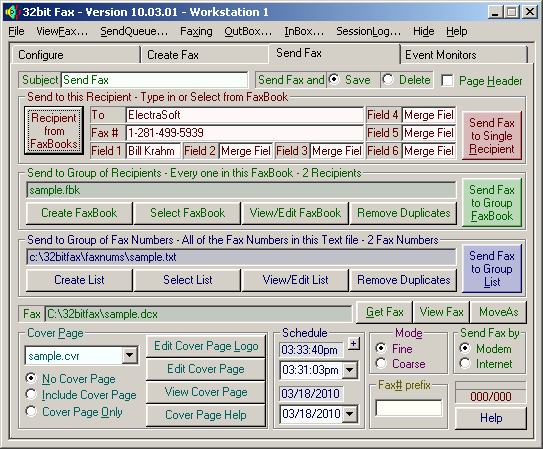
Click to enlarge 32bit Fax / 64bit Fax screenshot...
You will be sending and receiving faxes in a few minutes
from now with this full featured fax program. Send and
Receive fax from Single Computer and Modem; or Network with
Multiple Modems.
This faxing software includes Vista 64 bit fax, Vista 32 bit fax,
Windows XP fax, Windows 7 fax, and all other Windows 32 bit and 64 bit
fax drivers. The 64 bit print to fax supports all 64-bit and 32 bit
Windows operating systems includes x86, x64, EM64T, amd64 and ia64.
Options include:
Send faxes by fax modem, send faxes by email,
send fax over the Internet, and the ability to forward all incoming fax
to an email address in TIFF or PDF format.
Send fax via your Internet connection using our built in fax API. If
your fax recipient has an email address, this fax software program will
fax email it to them by attaching the fax to an email and do an
email fax to them in TIFF or PDF format.
Single Computer and Modem; or Network with Multiple Modems.
Our fax software can send faxes from your computer using your cell
phone fax modems too.
32bit Fax / 64bit Fax is popular with oil companies because it handles
downhole well log image faxing.
How do I send a fax directly from any Windows program such as
Microsoft Word, PowerPoint, Excel, Outlook, and all other programs
supporting [File], [Print]? If you can print it to your printer from
Microsoft Word or any other text or image editor, you can print it to
any and all the fax machines in the world. Yes, if you can [PRINT] it
to your printer, you can [FAX] it to any and all the fax machines in
the world!
Here's how: While in a program that has printing capabilities, (Excel,
MS-Word, etc) select [ElectraSoft Print to Fax] as your printer, and
print to it. The ElectraSoft [Send Fax] box will appear, allowing you
to fax it wherever you want.
All the Fax Machines in the world are your printers with ElectraSoft's
32bit Fax / 64bit Fax software.
If you want to Scan and fax. Load your, scanner copy to printer,
utility then select the [ElectraSoft Print to Fax] as your printer,
and print to it.
Where do you get the [ElectraSoft Print to Fax]? 32bit Fax / 64bit Fax includes
[ElectraSoft Print to Fax].
Try 32bit Fax / 64bit Fax and [ElectraSoft Print to Fax]
before you buy.
Click here to install and try [32bit Fax / 64bit Fax] and [ElectraSoft Print to Fax]
Interface your Computer to all the Fax Machines in the World via fax
modem. Send fax with modem, email and/or Internet.
All the Fax Machines in the world are your printers with
ElectraSoft's 32bit Fax / 64bit Fax software.
|
|
Who Uses
ElectraSoft
Software?
|
ElectraSoft
software is used by many well known establishments including military,
government, education, medical, business, and individuals.
Some users of
ElectraSoft
software include, United States Armed Forces, United States Senate,
University of Utah, Central Iowa Health Care System, San Diego Health
Department, IBM, and millions of small businesses and individuals.
|
32bit Fax / 64bit Fax features:
|
- Will auto start when Windows starts and is available in the system
tray.
- Select...
- number rings until the FaxModem answers.
- number of re-dials.
- length of time between re-dials.
- When re-dialing a fax number, re-dial...
- Set modem volume.
- Send/receive using up to four modems at the same time.
- When printing fax you can select: [Scale to printer] or
[Print actual FAX size].
- Send fax immediate or scheduled.
- If you fax-send-queue has many fax and you need to send a quick
fax immediately, type a 0 for the time and date schedule.
- Option to auto-print incoming faxes in the background.
- Send/receive fax in the background while you work in the foreground.
|
You need to use 32bit Fax / 64bit Fax if you are a...
|
- Restaurant Owner:
- Create your menu.
- Printing it to the
[ElectraSoft Print to Fax].
- Up will come the fax in the fax-viewer.
- Select a list of customer fax numbers and send.
- Get ready for the crowd.
- Company Owner:
Make your company look professional. When you send a fax from MS-Word
using the
[ElectraSoft Print to Fax],
the fax arrives at your recipients fax machine with laser quality.
- Individual:
When you need to send that occasional fax, send directly from MS-Word,
MS-Paint, your scanner, etc using the
[ElectraSoft Print to Fax],
the fax arrives at your recipients fax machine with laser quality.
|
What is a fax software program?
|
A fax software program is a program that takes the place of a fax machine.
The advantage of a fax program is that you do not have to print your
document and then put it on a fax scanner.
32bit Fax / 64bit Fax will let you print
to directly from MS-Paint, your scanner, etc to the
[ElectraSoft Print to Fax],
and send the fax with laser quality.
|
Send Faxes Using Your Program's FaxBook system and our Application
Programming Interface (API).
|
You can use our free fax API to send faxes programmatically from the
programs that you write, by using the following [Fax API] source-code.
If you want to create your own send fax program the simple and easy way,
just write your own simple fax program and let it take advantage of our
free fax API. This API has over 30 man years of development.
In just a few minutes from now, you can write a send fax program that
takes advantage of our powerful Fax API.
If you want to write a fax program using our [Fax API] with one of our fax
programs, and want more help than what is included in this manual, you can
buy our [Extended Fax API]. The [Extended Fax API] includes many easy to
use functions and sophisticated source-code. Just call Jon Krahmer at
281-499-8246, or email him at
eMail Jon Krahmer
or
eMail ElectraSoft
and you will receive the [Extended Fax API] kit and personalized
tech-support for only $499.99.
There are two methods to use this API...
Method 1, the simplest method:
Read Item 12 - Faxing, [Convert/Forward Document to Fax and Send...]
You will need to create a comma delimited file called:
?:\32bitfax\data\DocToFax.del
Where the ? is the drive that you installed 32bit Fax on. The DocToFax.del
file can have as many lines in it as you want. One for each recipient.
Code example:
LOOP:
- CREATE the ?:\32bitfax\data\DocToFax.del file
- Copy document into ?:\32bitfax\data\DocToFax
- WAIT until 32bit Fax deletes document from ?:\32bitfax\data\DocToFax
- If done EXIT else back to LOOP
EXIT:
Method 2:
You will need to create a comma delimited file called:
?:\32bitfax\send2fax.del
Where the ? is the drive that you installed 32bit Fax on. The send2fax.del
file can have as many lines in it as you want. One for each recipient.
Code example:
LOOP:
- CREATE the send2fax.del file
- PRINT document to: ElectraSoft Print to Fax
- WAIT until 32bit Fax deletes send2fax.del
- If done EXIT else back to LOOP
EXIT:
DocToFax.del and send2fax.del Format:
3, 5 or 6 field comma delimited file with the following format:
"Y/N(header at top of fax)","Recipient","FaxNumber"
or:
"Y/N(header at top of fax)","Recipient","FaxNumber","Scheduled Date","Scheduled Time"
or:
"Y/N(header at top of fax)","Recipient","FaxNumber","Scheduled Date","Scheduled Time","Subject","Fax From Name"
HeaderYN:
A 1 character field consisting of either Y or N
Recipient:
A 31 character field consisting of the Recipient
FaxNumber:
A 46 character field consisting of a Fax Number
The next 2 fields are optional...
Scheduled Date:
A 10 character field consisting of the day to send the Fax
Scheduled Time:
A 10 character field consisting of the time to send the Fax
Example:
"Y","Jon Krahmer","281-499-5939"
or:
"Y","Jon Krahmer","281-499-5939","06-14-2018","10:30:00am"
or:
"Y","Jon Krahmer","281-499-5939","06-14-2018","10:30:00am","Subject","Fax From Name"
32bit Fax must be running in the background. The ?:\32bitfax\send2fax.del
file must be create in the 32bit Fax directory. Print to the ElectraSoft
Print to Fax. The ElectraSoft Print to Fax will create a ?:\esfax\fax file.
32bit Fax will see this file, convert it to a fax and call the Send Fax box.
The Send Fax will see the ?:\32bitfax\send2fax.del file and instead of it's
normal routine, it will work invisibly to send the fax as per the
?:\32bitfax\send2fax.del file and then delete ?:\32bitfax\send2fax.del. The
next time you load the Send Fax box, it will work as normal.
Code example:
LOOP:
o CREATE the send2fax.del file
o PRINT document to: ElectraSoft Print to Fax
o WAIT until 32bit Fax deletes send2fax.del
o If done EXIT else back to LOOP
EXIT:
//= = = = = = = = = = = = = = = StartData = = = = = = = = = = = = = = =
char szStr1024[1024];
char szSend2Fax_Del[]={"c:\\32bitfax\\send2fax.del"};
char szFaxToThisRecipient1[1024]=
{
"\"Y\",\"ElectraSoft\",\"281-499-5939\""
};
char szFaxToThisRecipient2[1024]=
{
"\"Y\",\"ElectraSoft\",\"281-499-5939\",\"2001-06-15\",\"10:30:00am\""
};
char szFaxToThisRecipient3[1024]=
{
"\"Y\",\"ElectraSoft\",\"281-499-5939\",\"2001-06-15\",\"10:30:00am\"",\"Subject\""
};
int iNumOfDocsToFaxToThisRecipient=3;
//= = = = = = = = = = = = = = = = EndData = = = = = = = = = = = = = = = =
//= = = = = = = = = = = = = = StartPrototypes = = = = = = = = = = = = = =
void MyProgramsFaxProc(void);
BOOL PrintTheseDocsToElectraSoftPrintToFax(int iNumOfPrintJobs, char* pszFaxToThisRecipient);
BOOL PrintJobToElectraSoftPrintToFax(int iJob);
BOOL WaitForElectraSoftPrintToFax(void);
BOOL CreateSend2Fax_Del(char *pszFaxToThisRecipient);
void DelayMs(DWORD dwMs);
//= = = = = = = = = = = = = = EndPrototypes = = = = = = = = = = = = = = =
//= = = = = = = = = = = = = = = StartCode = = = = = = = = = = = = = = = =
//= = = = = = = = = = = = = = = = = = = = = = = = = = = = = = = = = = =
//| Example of what a call to PrintTheseDocsToElectraSoftPrintToFax may
//| look like.
//= = = = = = = = = = = = = = = = = = = = = = = = = = = = = = = = = = =
void MyProgramsFaxProc(void)
{
char szErrorMessageCption[]=
{
"MyProgramsFaxProc return value"
};
char szReturnedFalse[]=
{
"MyProgramsFaxProc returned FALSE"
};
char szReturnedTrue[]=
{
"MyProgramsFaxProc returned TRUE"
};
//= = = = = = = = = = = = = = = = = = = = = = = = = = = = = = = = = = =
//| Remove comments and replace with your application specific
//| source-code.
//= = = = = = = = = = = = = = = = = = = = = = = = = = = = = = = = = = =
//Init MyProgramsFaxProc() and get set vars.
if(PrintTheseDocsToElectraSoftPrintToFax( iNumOfDocsToFaxToThisRecipient, szFaxToThisRecipient1) == TRUE)
{
::MessageBox(GetForegroundWindow(), szReturnedTrue, szErrorMessageCption, MB_ICONSTOP | MB_OK);
}
else
{
::MessageBox(GetForegroundWindow(), szReturnedFalse, szErrorMessageCption, MB_ICONSTOP | MB_OK);
}
}
//= = = = = = = = = = = = = = = = = = = = = = = = = = = = = = = = = = = =
//| BOOL PrintTheseDocsToElectraSoftPrintToFax(int iNumOfPrintJobs,
//| char* pszFaxToThisRecipient);
//|=- - - - - - - - - - - - - - - - - - - - - - - - - - - - - - - - - - =
//| BOOL PrintTheseDocsToElectraSoftPrintToFax(int iNumOfPrintJobs,
//| char* pszFaxToThisRecipient);
//| will send(put in SendQueue) 1 or more documents to
//| pszFaxToThisRecipient.
//|
//| In this example, the FaxNumber is hard-coded to szFaxToThisRecipient1.
//|
//| You, as a programmer, will replace szFaxToThisRecipient1 with a
//| variable. If sending 1 or more documents to a list of 1 or more
//| FaxNumbers, incrementally set szFaxToThisRecipient1 to a different
//| FaxNumber in the list, and call PrintTheseDocsToElectraSoftPrintToFax
//| once for each FaxNumber that you want to send the fax/faxes to.
//= = = = = = = = = = = = = = = = = = = = = = = = = = = = = = = = = = = =
BOOL PrintTheseDocsToElectraSoftPrintToFax(int iNumOfPrintJobs,
char* pszFaxToThisRecipient)
{
BOOL bRet=TRUE;
//= = = = = = = = = = = = = = = = = = = = = = = = = = = = = = = = = =
//| LOOP
//= = = = = = = = = = = = = = = = = = = = = = = = = = = = = = = = = =
for(int iJob=1;iJob<=iNumOfPrintJobs;iJob++)
{
//= = = = = = = = = = = = = = = = = = = = = = = = = = = = = = = = = =
//| CREATE the send2fax.del file
//= = = = = = = = = = = = = = = = = = = = = = = = = = = = = = = = = =
if(CreateSend2Fax_Del(pszFaxToThisRecipient)= FALSE)
{
bRet=FALSE;
break;
}
//= = = = = = = = = = = = = = = = = = = = = = = = = = = = = = = = = =
//| PRINT document to: ElectraSoft Print to Fax
//= = = = = = = = = = = = = = = = = = = = = = = = = = = = = = = = = =
if(PrintJobToElectraSoftPrintToFax(iJob)= FALSE)
{
bRet=FALSE;
break;
}
//= = = = = = = = = = = = = = = = = = = = = = = = = = = = = = = = = =
//| WAIT until 32bit Fax deletes send2fax.del
//= = = = = = = = = = = = = = = = = = = = = = = = = = = = = = = = = =
if(WaitForElectraSoftPrintToFax()= FALSE)
{
bRet=FALSE;
break;
}
//= = = = = = = = = = = = = = = = = = = = = = = = = = = = = = = = = =
//| If done EXIT else back to LOOP
//= = = = = = = = = = = = = = = = = = = = = = = = = = = = = = = = = =
}//End- - - for(int iJob=1;iJob<=iNumOfPrintJobs;iJob++)
//= = = = = = = = = = = = = = = = = = = = = = = = = = = = = = = = = =
//| EXIT
//= = = = = = = = = = = = = = = = = = = = = = = = = = = = = = = = = =
return(bRet);
}
BOOL CreateSend2Fax_Del(char *pszFaxToThisRecipient)
{
int iSend2Fax_Del;
if((iSend2Fax_Del=_open(szSend2Fax_Del, _O_CREAT | _O_TRUNC | _O_BINARY | _O_RDWR, _S_IREAD | _S_IWRITE)) < 0)
{
sprintf(szStr1024,"Could not create:\n"
"%s"
,szSend2Fax_Del);
::MessageBox(GetForegroundWindow(),
szStr1024,szAppsMsgCaption,MB_OK | MB_ICONSTOP);
return(FALSE);
}
if(_write(iSend2Fax_Del,pszFaxToThisRecipient,
(WORD)strlen(pszFaxToThisRecipient)) !=
(int)strlen(pszFaxToThisRecipient))
{
_close(iSend2Fax_Del);
return(FALSE);
}
_close(iSend2Fax_Del);
return(TRUE);
}
BOOL PrintJobToElectraSoftPrintToFax(int iJob)
{
//= = = = = = = = = = = = = = = = = = = = = = = = = = = = = = = = = = =
//| Remove comments and replace with your application specific
//| source-code.
//= = = = = = = = = = = = = = = = = = = = = = = = = = = = = = = = = = =
//if(Your Print Routine Fails)
//{
// return(FALSE);
//}
return(TRUE);
}
BOOL WaitForElectraSoftPrintToFax(void)
{
for(int iWait=0;;iWait++)
{
if(_access(szSend2Fax_Del,0)!=0)
{
break;
}
//= = = = = = = = = = = = = = = = = = = = = = = = = = = = = = = =
//| 100 ms X 300 loops = 30000 ms = 30 seconds to time-out.
//= = = = = = = = = = = = = = = = = = = = = = = = = = = = = = = =
DelayMs(100);
if(iWait= 300)
{
if(::MessageBox(GetForegroundWindow(),
"Last print job not done."
,"Apps Caption"
,MB_DEFBUTTON1 | MB_ICONQUESTION | MB_RETRYCANCEL) = IDCANCEL)
{
return(FALSE);
}
iWait=0;
}
}
return(TRUE);
}
void DelayMs(DWORD dwMs)
{
MSG msg;
struct _timeb timebCurTime;
DWORD dwCurTime,dwStopTime,dwSleepTime;
dwSleepTime=(dwMs/10);
if(dwSleepTime<1) dwSleepTime = 1;
if(dwSleepTime>100) dwSleepTime = 100;
_ftime(&timebCurTime);
dwStopTime=(((timebCurTime.time * 1000) + timebCurTime.millitm) + dwMs);
do
{
Sleep(dwSleepTime);
if(PeekMessage(&msg, NULL, 0 , 0, PM_REMOVE) != FALSE)
{
TranslateMessage(&msg);
DispatchMessage(&msg);
}
_ftime(&timebCurTime);
dwCurTime=((timebCurTime.time*1000) + timebCurTime.millitm);
if(iTimeChangeFg>0)
{
--iTimeChangeFg;
break;
}
}while(dwCurTime < dwStopTime);
}
//= = = = = = = = = = = = = = = = EndCode = = = = = = = = = = = = = = = =
|
|